PSA: This is a Beta environment designed to give players a first-hand look at plugins and how they work. As a result, any progress made on these worlds will not carry over to the live game.
This is especially important when using Quest Helper, as any quest progress you make during the Beta won't be retained. We know that may feel a little jarring, so please keep it in mind while exploring!
A quick note before we get started: This blog covers today's launch of the API Plugins Beta. We're keeping to our game update schedule, especially as we do know that there are many players looking forward to these updates.
We've just provided an update regarding Reignited over on this blog - if you're interested in finding out more on that, please do have a look there.
Without further ado, let's get into Plugins!
RuneScape API Plugin Hub (Beta): Out Now!
Announced earlier this year in January as a major part of our 2026 Roadmap, the API Project is on course to bring Plugins to RuneScape.
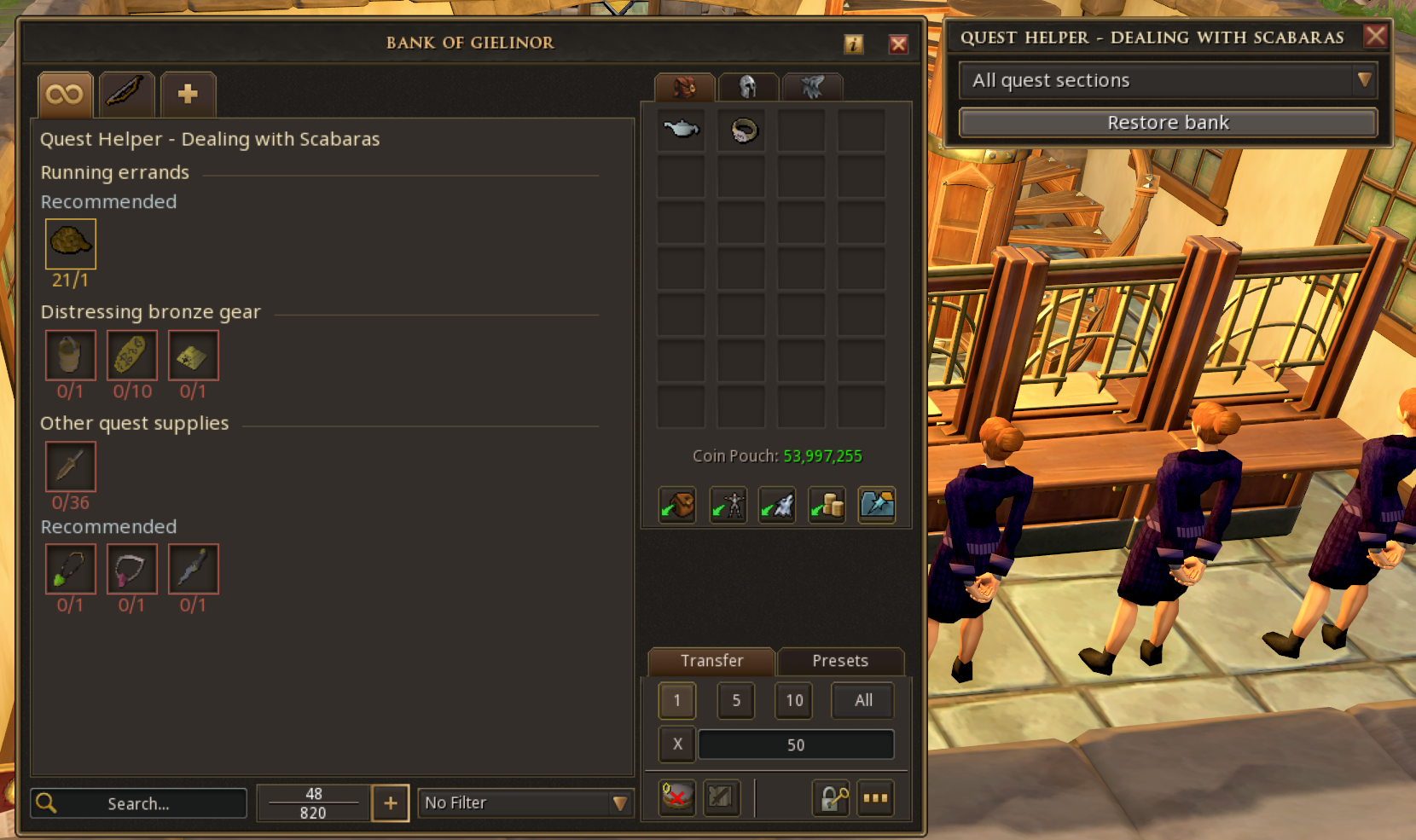
Plugins are tools created by community developers that can shape your gameplay experience in all sorts of ways. If you’ve played Old School RuneScape, you might already be familiar with what they can offer. Quest Helper, for example, is a popular plugin that guides you through quests, while others offer more bespoke experiences designed around the community and content creation, such as Tileman Mode.
We know just how important this update is to so many of you, and we’ve been listening closely to your feedback.
Well… we have some news.
For the past few months, we’ve been working behind the scenes with some of the most talented developers in our community to bring Plugins to RuneScape and today we’re launching the RS Plugins Beta!
Starting right now, you can jump in to the Beta worlds and try a selection of five major plugins, with even more already on the way in the coming weeks.
(And, before you ask: Yes, Quest Helper is one of them!)
Whether you’ve been playing every day or waiting for the right reason to hop back in, this marks the beginning of a huge change for RuneScape.
Very soon, our community will have all the tools you need to create meaningful plugins that affect thousands of players’ experiences. What kinds of weird and wonderful creations will you come up with? We can’t wait to find out and support you on your journey.
This is just the beginning. Let’s find out more!
Before we get into the details, let's take a moment to explain what we mean when we talk about plugins, APIs and the Plugin Hub.
What is the RS API?
The RS API is the part of RuneScape that allows developers to create plugins. It controls what information plugins can access from the game and what they’re able to do with it.
For example, the Quest Helper plugin needs to know where you are in a quest so it can show you the right guidance for your next step.
What is a RS plugin?
A RS plugin is a tool created by a community developer that enhances your gameplay experience in a particular way.
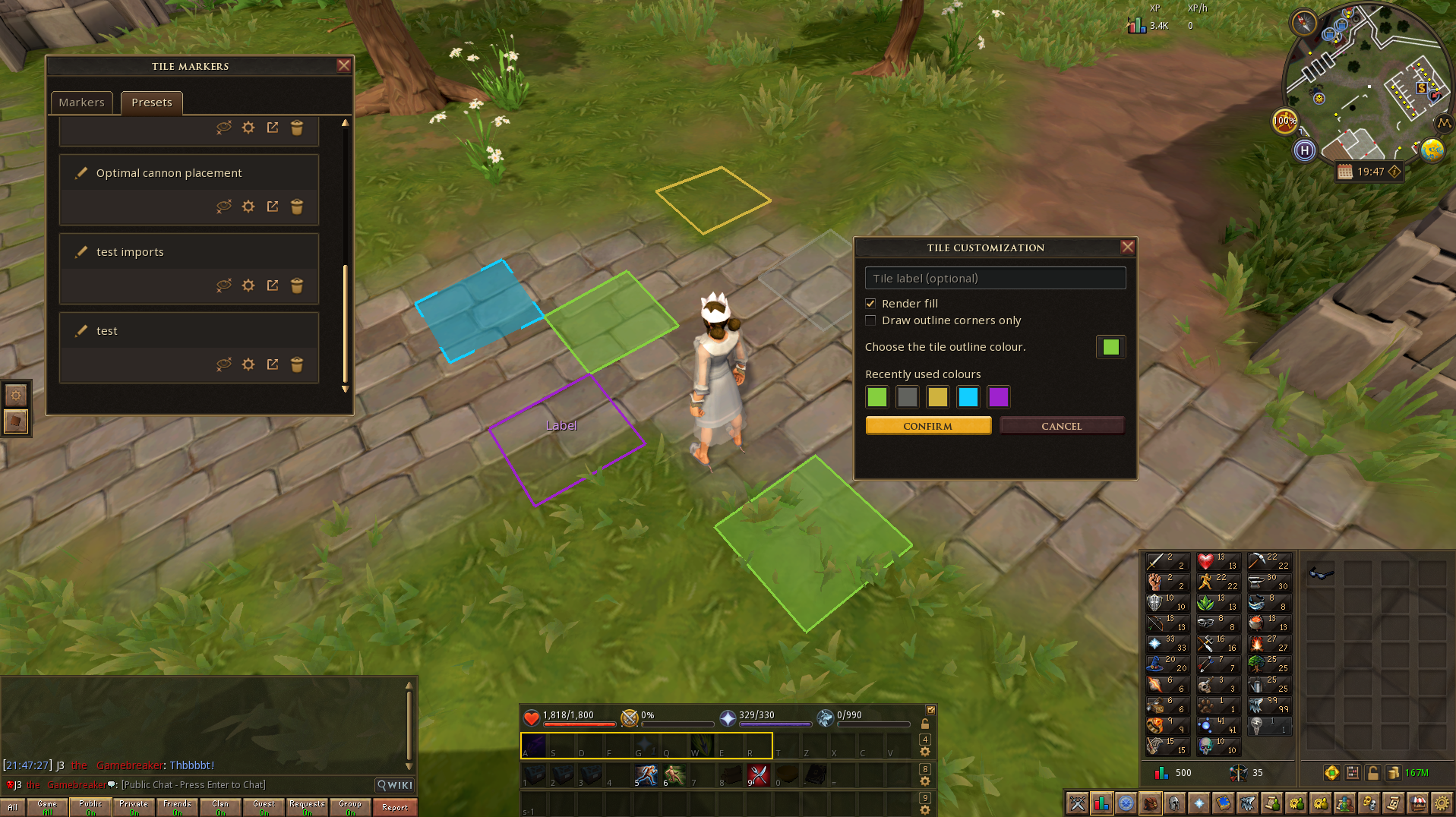
Different plugins can do very different things. Quest Helper, for example, is designed to guide you through quests, while a plugin like Tilemarkers allows you to mark useful locations in the game world.
A few extra things to note here: What's possible with plugins is constrained by the data access that the API sends and the UI windows that the engine provides. While the plugins we are sharing today may look similar to what projects like RuneLite have provided for Old School RuneScape, this is not a 1:1, and certain aspects of the API project will be different, both in terms of functionality and limitations. With the RuneScape API project, we're very keen to ensure that plugins maintain a place as a healthy addition to RuneScape, so we are making sure that they follow our set of core principles for what plugins may and must not be allowed to do.
If you're unsure why a particular plugin might not have a feature or design you're expecting, do check in with the developers to find out more! You can also read more about guidelines that our community developers have been following below.
What is the RS Plugin Hub?
The RS Plugin Hub is the part of the game interface where you can browse, install and manage the plugins you want to use.
Community developers will use the RS API to build their plugins, which can then be submitted to the Plugin Hub for all of you to discover and use!
Beta for Plugins – AVAILABLE NOW!
For this initial Beta, we’ve selected five plugins. Starting with a limited selection of plugins allows the team to ensure everything is running smoothly before we add more on top of the system.
We’ve prioritised the ones that matter most to you. Yes, that means Quest Helper made it onto the list!
The five plugins available now are:
How often will plugins be added?
There are lots more plugins in development right now! Some are ready to go and are actively being reviewed by our Plugin Moderation team, and others are still in development as we work out the technical dependencies. Our plan at the moment is to split them into regular batched releases, with the next batch arriving in the coming weeks, gathering your feedback along the way.
We're using this initial Beta testing period to ensure the system works as expected. When we're happy with the final build, the API itself will become public, effectively allowing anyone to create plugins if they wish, though all plugins will still need to pass through our moderation process. We will likely continue to release plugins in batches for the foreseeable future, as this allows our team to create sustainable moderation processes and gives us the opportunity to highlight plugins as they release through our own news posts. We'll see how this approach works and may tweak it as we continue to support the API and Plugins project in the long-term.
From our side, we’ll moderate and approve plugins, and offer our community developers support wherever we can. However, the plugins themselves will always remain community-led, meaning that we won’t take excessive control over their development or attempt to dictate the cadence of future updates to them.
It's worth reiterating: Each and every plugin has been created by talented developers from our community, who have poured an incredible amount of their own time, care and effort into making them for you to enjoy! We’re incredibly thankful for the time, care and effort our community developers have poured into bringing these plugins to RuneScape. These are dedicated players just like you, building plugins in their own time, alongside their own lives and responsibilities. Please keep that in mind when it comes to updates, fixes and new features!
Are plugins available on Mobile?
Plugins aren't available on Mobile yet, this is planned at a later date once we're confident in the system working as expected.
Will the RS Plugin hub be available in different languages?
At the moment, the RS Plugin hub is launching in English as we focus on delivering on all the technical complexities of this project, before we expand into other languages. We'll let you know if this changes in the future, and we're open to your feedback once it's out.
Leave your feedback
Your feedback is crucial to us. Whether you want to report a bug or request a plugin directly to our group of community developers, please get involved. Your feedback will help us identify bugs, iron out any issues and continue improving the plugin experience throughout the Beta.
Once the update goes live, we'll create some dedicated channels via Discord or Reddit, where you can leave your feedback! Feel free to directly ping Mod Light as the Community Manager working on the project if you're looking for someone to pass feedback on directly to.
The link will load the Jagex Launcher, then start loading the Beta and log you in automatically.
If you're not using the Jagex Launcher (just the RuneScape Client)
On Steam
On 'Library' tab on Steam right-click 'RuneScape' and click 'Properties'.
On the 'General' section paste the following command under 'Launch Options':'%command% --configURI rs-launch://world204.runescape.com/jav_config_beta.ws'
Close the interface and click 'Play'
Once loaded you'll be able to log in and select the Beta world 204.
When you first log in to the Beta, you'll start with a fresh save by default. If you'd prefer to use the progress from your live RuneScape account, you can choose Import Save from the Beta lobby. This will copy your current live account progress into the Beta.
If you want to try Quest Helper on early-game quests, we recommend using the fresh Beta save before importing your live save. This will give you access to those quests from the beginning so you can test the plugin properly.
If you want to start fresh again on another account, you can also use an alt or create a new account for the Beta. Beta access does not require membership.
How to Leave The Beta
To re-access the regular live worlds, simply close both the game and the launcher (you may need to close the process in your task manager), then relaunch the game as you normally would.
How to access Plugins
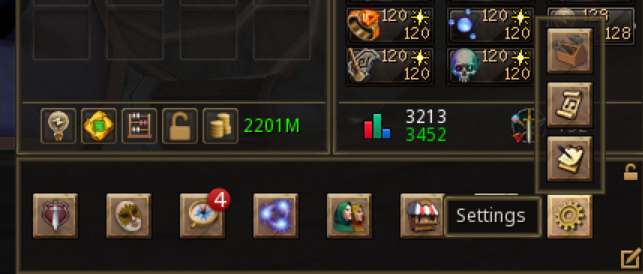
Once you're in-game, you can access the RS Plugin Hub through the Ribbon menu. Look for the toolbox icon in the bottom-right area of your screen.
From there, you can browse and install available plugins, manage or uninstall the ones you’re already using, and report any issues directly through the Hub.
Once you've installed a plugin, you'll also need to enable it within the "Manage" tab of the Plugin Hub.
Classic interface mode
The toolbox will be on your ribbon by default as shown below:
Modern interface mode
If you're using the default ribbon (the one that just shows parent windows), you can access the toolbox by hovering over the Settings button.
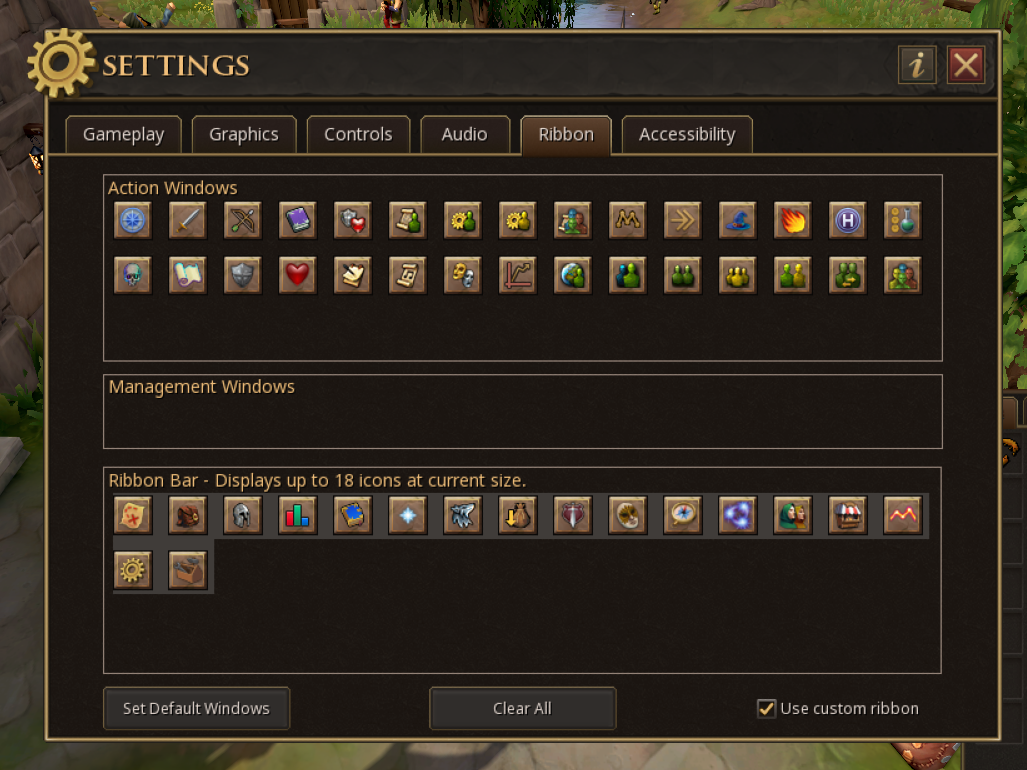
If you are using the custom ribbon (where you can choose what is displayed), the toolbox will be placed at the end of the ribbon for you if there is space to do so.
If you don't have space, simply edit the ribbon to add it.
Community Developers: How to Get Involved
Do you have an idea for a plugin you’d love to see in RuneScape?
We want to meet you! Hang tight, though. We're still in Beta mode, so the API is not publicly accessible yet. However, as announced in our RuneScape Summit, we're almost there. In October, we're opening up RuneScape Plugin Development to everyone, meaning you'll be able to participate, create plugins and get involved!
We got the chance to speak directly with some of you at RuneFest who expressed an interest in getting involved, and we can't wait to see what creative tools you bring to the game.
Our immediate focus will be to ensure our API is fully functional, taking into account player feedback. However, within the next month when it opens up publicly, we'll release a dedicated blog post that contains everything you need to know on how to get involved, including documentation, requirements, guidelines, and more!
Below you will find navigation buttons to different sections! Check them all out by clicking on them.
 RuneNation
 Join our Learner PvM Discord